How can I set a capacity limit for registrations?
A maximum number of registrations allowed can be set in the Event Dashboard. Once this limit is reached, registrations will no longer be accepted for your event. Registration orders can still be created in the Event Dashboard.
Contents
- Understanding Capacity Limits for Event Registration
- Adjusting the Capacity Limits in the Event Dashboard
- Setting Capacity Limits for Individual Tickets
Understanding Capacity Limits for Event Registration
The capacity for your event can be modified to only count registrations that meet specific conditions. The following limits can be applied for your capacity:

| Attendees | The capacity limit will be set by the number of attendees in your event. |
|---|---|
| Ticket Purchased | The capacity limit will be set by the number of Ticket Purchases made under Registration > Ticket Purchases. |
| Registrations | The capacity limit will be set by the number of registrations made under Registration > Orders. |
| Specified Tickets Purchased | The capacity limit will increase whenever a registration that includes the selected tickets are made. Use the Tickets for Capacity Calculation field to select the tickets. |
| Registrations from Specified Categories | The capacity limit will increase whenever a registration that includes the selected categories are made. Use the Categories for Capacity Calculation field to select the categories. |
| Non Add-on Tickets Purchased | The capacity limit will be affected by all purchased tickets, except for add-on tickets. |
Adjusting the Capacity Limits in the Event Dashboard
- From the Event Dashboard, navigate to Registration > Settings
- Scroll down to Capacity Configuration

- Under the Capacity field, enter the maximum number of registrations that can be made for your event
- Under the Capacity Based On field, select what criteria will impact the capacity limit

- If you have selected Specified Tickets Purchased, use the Tickets for Capacity Calculation field to select the tickets.

- If you have selected Registrations from Specified Categories, use the Categories for Capacity Calculation field to select the categories.

- Select Save Changes

Once the capacity is set, you can review your event's capacity as a donut chart by navigating to General > EventPulse:

Setting Capacity Limits for Individual Tickets
Where event capacity considers a global limit, ticket capacities allow you to apply capacities on a per-ticket basis.
Please note that ticket capacities are only relevant for paid registration and do not apply to instances of no ticket registration set-ups.
- From the Event Dashboard, navigate to Registration > Tickets
- Select the ticket you wish to adjust from the list
- Scroll down to Other Details
-
Under the Quantity Available field, enter the number of tickets that can be sold to registrants
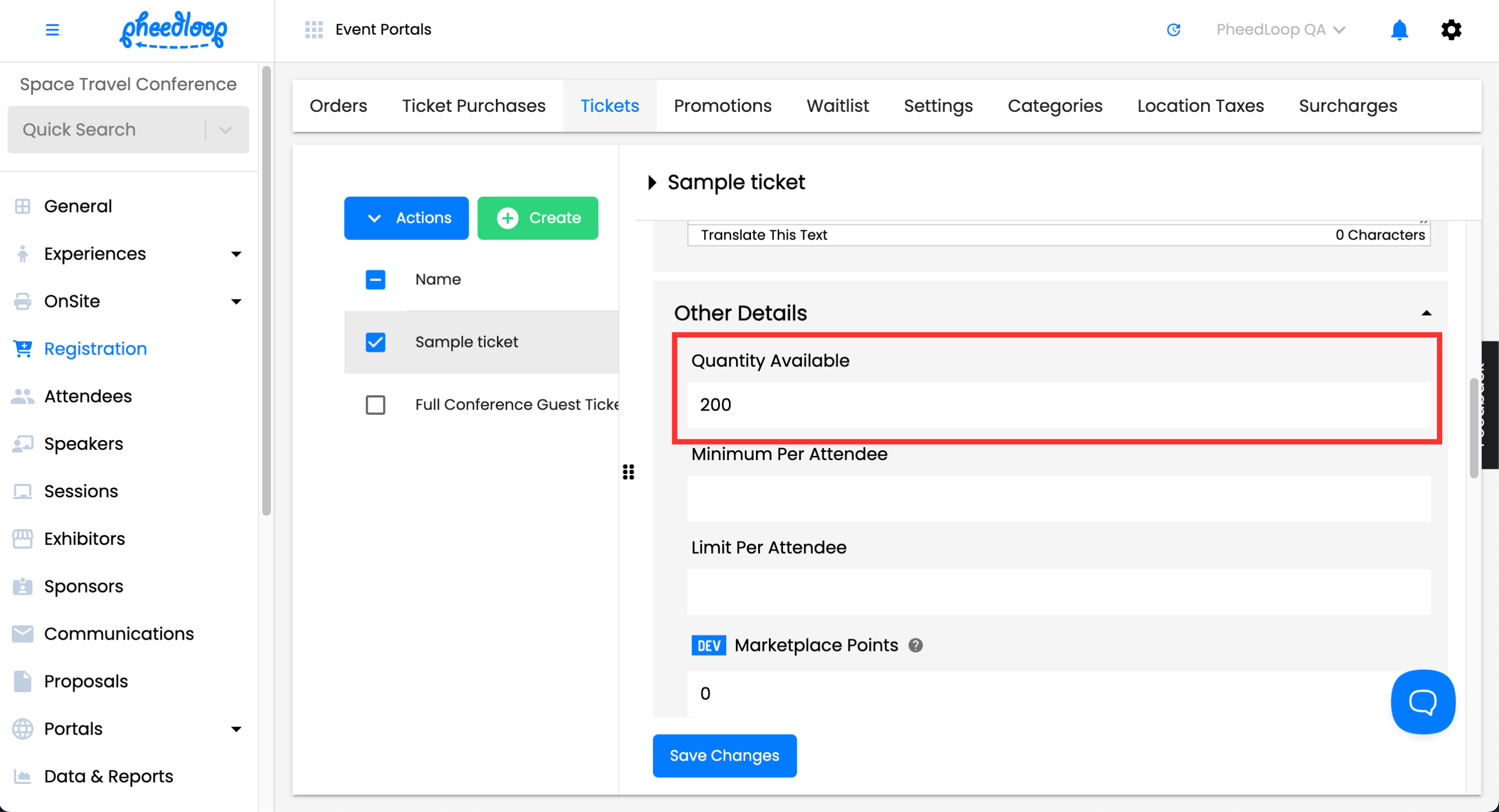
- Select Save Changes
If you would like to read further on closing registrations, please refer to our How can I close registration for my event? article.