How do I control how attendee information is prefilled for multiple ticket orders?
When someone purchases multiple tickets at once, you can control whether their information automatically fills in the attendee details for those tickets with the Pre-fill Ticket Info setting. This setting helps you balance convenience for buyers with accurate attendee tracking.
Available Options
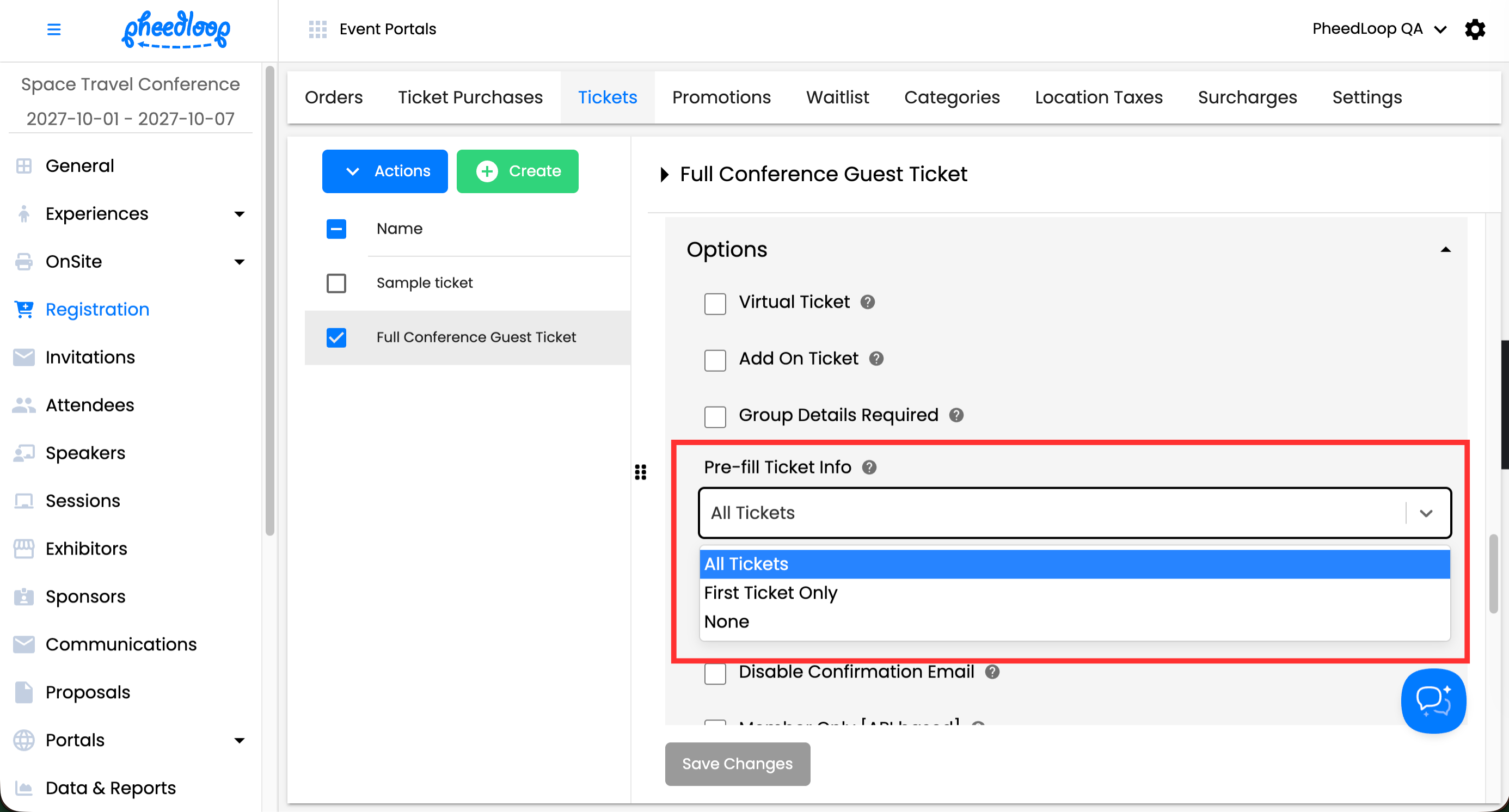
There are three ways to handle attendee information prefill:
- All tickets: The buyer's information is automatically added to every ticket in their order. This is the fastest option for buyers purchasing multiple tickets for themselves. This option is unavailable when Group Details Required is enabled, as each attendee must have unique information.
- First ticket only: The buyer's information is added only to the first ticket. Remaining tickets are left blank for the buyer to fill in manually. This works well when buyers typically purchase tickets for themselves and others. This is the default setting for created tickets.
- None (manual entry required): No tickets are prefilled with the buyer's information. The buyer must manually enter attendee details for every ticket, including their own. This ensures you collect unique information for each attendee.
How to Change This Setting
- From the Event Dashboard, navigate to Registration > Tickets
- Select the ticket you wish to adjust from the list
- Scroll down to Options
- Under the Pre-fill Ticket Info field, select All Tickets, First Ticket Only, or None
-
Select Save Changes
When to Use Each Option
Use "All tickets" when:
- Individual attendees typically purchase multiple tickets for themselves (e.g., multi-day passes, workshop bundles)
- You want to minimize friction in the checkout process
- Attendee tracking is less critical for your event
Use "Prefill first ticket only" when:
- Buyers commonly purchase tickets for themselves and guests
- You need accurate attendee information but want to offer some convenience
- You want to suggest the buyer is an attendee while allowing flexibility
Use "None" when:
- You require unique attendee information for every ticket
- You need accurate contact details for each individual attendee
- Compliance or tracking requirements demand verified information for each ticket
Frequently Asked Questions
Can buyers change the prefilled information? Yes, buyers can edit any prefilled information before completing their purchase.
Will this affect tickets that have already been sold? No, this setting only applies to new orders placed after you make the change.
Can I set this differently for different ticket types? Yes, this setting is done on a per-ticket basis, meaning pre-fill behaviour can be different for each ticket type.